
Troubleshooting Source Connection Issues
Source connection issues prevent Curator from pulling content. Most problems stem from authorization, account types, or plan limitations.
Common Issues & Solutions
Hashtag Posts Not Showing
Problem: Instagram or TikTok hashtag source added, but no posts appear.
Solutions:
Check that the account or hashtag is active, public and has recent posts.
Ensure the account or hashtag is spelled correctly.
Premium Source Requires Upgrade
Problem: Error when adding LinkedIn, Twitter/X, TikTok, or Google Reviews.
Solution: These are premium sources requiring a Business plan or higher. Upgrade your plan in Settings > Billing to access them. The Business plan includes X (formerly Twitter), 1 TikTok hashtag source, 1 LinkedIn source, and 1 Google Reviews Premium source. Purchasing a +15 source add-on increases your limit by +1 additional source for each limited Premium source (TikTok, LinkedIn, Google Reviews).
Instagram Business Account Common Errors
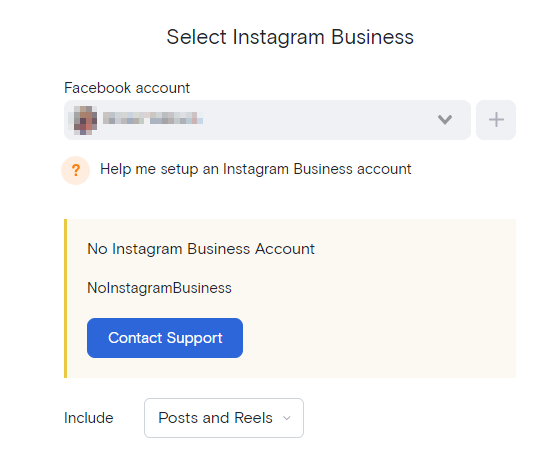
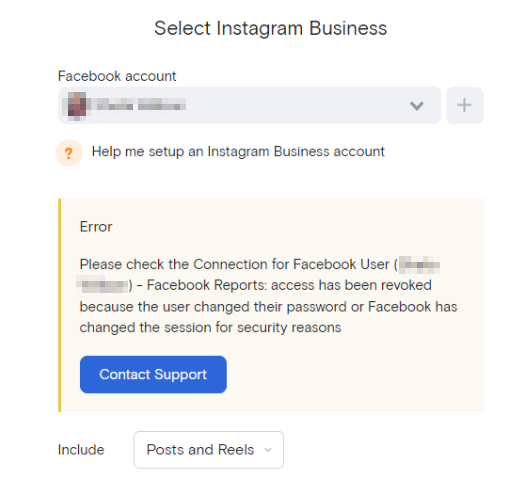
Problem: "NoInstagramBusiness" or "Please check the Connection for Facebook...." error when adding source
Solutions:
Revoke the existing connection (Settings > Social Connections) and reconnect.
Ensure that all Instagram accounts and their associated Facebook pages are selected in the connection process.
Check that all permissions are enabled.
Instagram accounts must be linked to a Facebook page.
If both your Facebook and Instagram accounts are connected in Social Connections, reconnect both accounts when you reconnect one.
Source Pulling Only 25 Posts
Problem: Feed shows far fewer posts than expected.
Reason:
Due to recent API changes, this is no longer possible for particular sources.
The limit of 25 posts helps reduce strain on our servers, especially for Sources or hashtags with thousands of posts.
Sources will refresh regularly, pulling up to 20-25 of the most recent posts each time, keeping your feed updated with the latest content.
If you're using Facebook Page, Instagram Account, or Flickr Album sources and are on a paid plan, you can email us at [email protected]. Curator team can manually attempt to load those other or older posts that weren't pulled due to the initial cap.
Connection Expired
Problem: Source stopped updating; dashboard shows "Connection expired."
Solution: Social platforms require periodic re-authorization. Go to Social Connections, find the expired connection, and click Reconnect.
Facebook & Instagram only: If both accounts are connected in Social Connections, reconnect both when reconnecting one.
400 Session Invalid Error When Connecting Instagram Account
Problem: Cannot proceed connecting Instagram account due to Instagram's 400 session error.
Solution: Connect your Instagram account using the alternative steps below:
Your Instagram account must be linked to a Facebook page before proceeding.
Login to your Curator account
Add Instagram Account source through this link - Add Instagram Business Account Source
It will prompt you to connect a Facebook account — make sure it has admin permissions for the Facebook Page linked to the Instagram account
Check that all permissions are enabled and grant access.
Click Continue to return to the adding source page.
Proceed adding the source.
Still Having Issues?
If these steps don't resolve the problem:
Check Curator's status page for platform-wide issues.
Contact support with your feed name, source type, and screenshot of the error message.