
Updating Feed Widget Version
If you have feeds on an older version of the Curator widget, you should update to version 6 to get important security fixes and performance improvements.
You'll need to republish your feed after updating the widget version for changes to take effect.
Update from the Publish page
The easiest way to update your widget version:
Go to your Publish section
Select the Feed from the dropdown
Look for the update notification banner at the top
Click Update now
Click Publish Changes or Get Code to finalize
The new embed code will automatically use version 6.
Update from the Publish > Feed tab
You can also manually change the widget version:
Go to Publish section
Navigate to the Feed tab
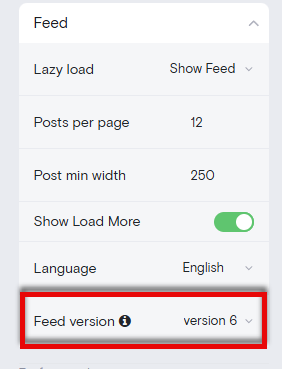
Find the widget version settings
Select version 6 from the dropdown
Click Publish Changes or Get Code
If you've made custom CSS changes targeting specific widget elements, test your feed after updating to ensure styles still apply correctly.
Why update?
Version 6 includes:
Critical security patches
Better performance
Bug fixes for edge cases in older browsers
For help with styling after updating, see Custom CSS Advanced Styling. If you encounter issues after updating, check Troubleshooting Embed Issues.